macOS VMs with accelerated graphics.
Reims vGPU gives macOS in QEMU a GPU: Metal on an Apple silicon Mac, Vulkan on Linux, driven by the paravirtual GPU driver macOS already ships. Its tool, reims-ctl, creates the VM, installs macOS from Apple, and opens each display in a window of its own.
$ git clone https://github.com/steelbrain/reims-vgpu
$ cd reims-vgpu && scripts/install-ctl.sh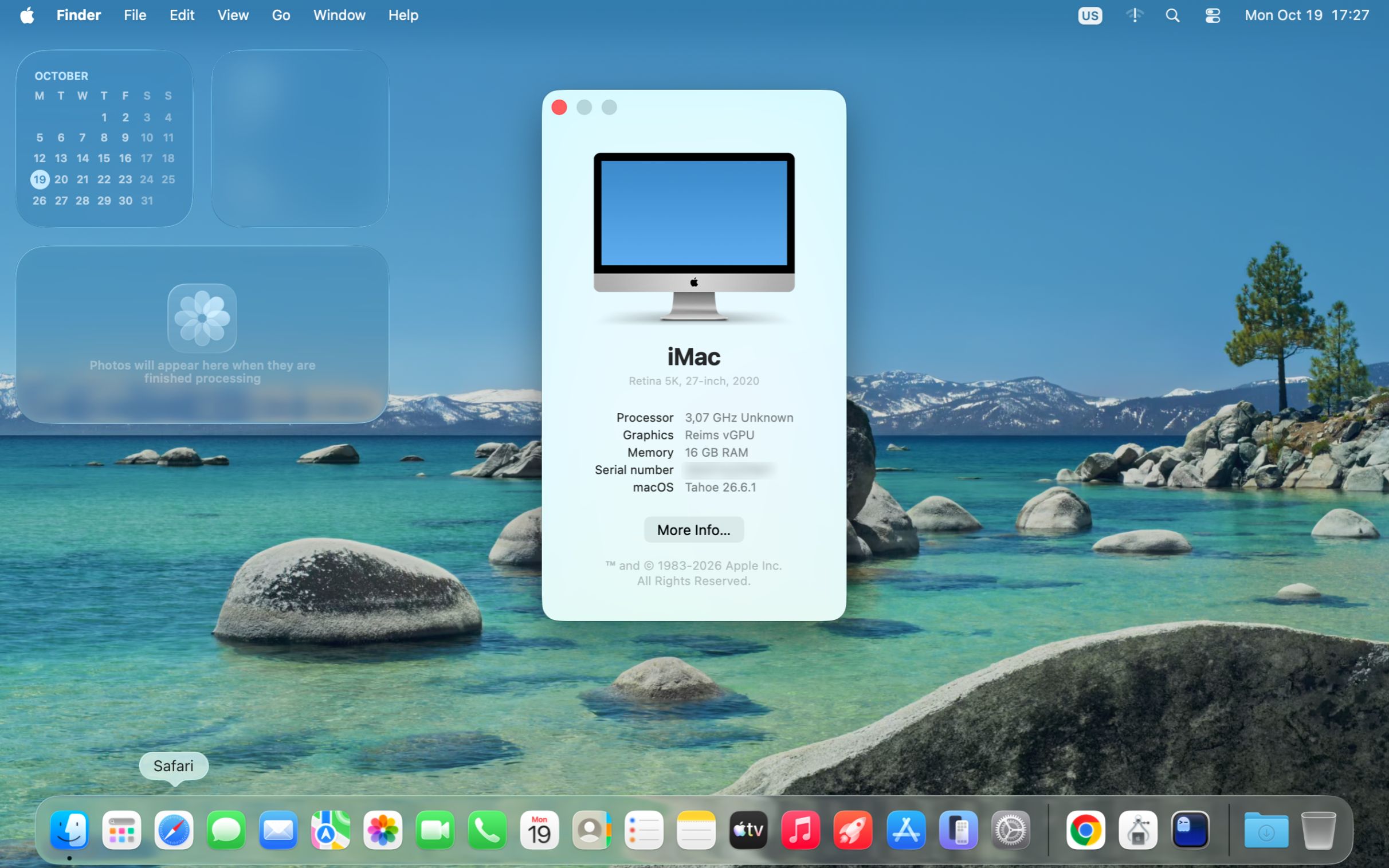
Walkthrough
From a clone to a macOS desktop.
Four steps, each with what the terminal printed when we ran it, on an M3 Max Mac and a Linux laptop. reims-ctl works the same on both; only where macOS comes from differs.
Install
reims-ctlThe installer builds the GPU library, a QEMU that uses it, and
reims-ctl. It asks before it installs anything the build needs: Homebrew packages on a Mac, apt or pacman packages on Linux, Rust through rustup.Then
reims-ctl doctorchecks the host and the install.$ scripts/install-ctl.sh $ reims-ctl doctor$ reims-ctl doctor ok host: macOS on arm64, runs vmapple-arm64 VMs ok files: settings in ~/.config/reims-ctl, VMs and QEMU in ~/.local/share/reims-ctl ok qemu: ~/.local/share/reims-ctl/qemu/current/bin/qemu-system-aarch64 (QEMU emulator version 11.1.50) ok audio backends: none, coreaudio, dbus, wav (default coreaudio) ok checkout: ~/Projects/steelbrain/reims-vgpu at c03936edf, following the development channel (development) ok vmapple boot ROM: /System/Library/Frameworks/Virtualization.framework/Resources/AVPBooter.vmapple2.bin ok virtualization entitlement: present (installs from IPSWs)Create a VM
On x86-64 Linux, from Apple's recovery image
createdownloads macOS 26's recovery image, about 1 GB, and makes the VM's OpenCore image and disk. macOS installs from Recovery on the VM's first start; the Linux guide walks through it.$ reims-ctl create mac --macos tahoeOn an Apple silicon Mac, from Apple's IPSW
macOS is installed when
createfinishes: 3 min 17 s on an M3 Max with the IPSW already downloaded.latestasks Apple for the newest release the Mac supports and keeps the download for your next VM.$ reims-ctl create mac --ipsw latest$ reims-ctl create mac --macos tahoe mac: asking Apple for the macOS Tahoe 26 recovery image mac: Apple's product 140-93589 mac: checking what is already downloaded mac: checking what is already downloaded: 1% of 961 MB mac: checking what is already downloaded: 100% of 961 MB mac: ~/.local/share/reims-ctl/installers/macOS-Tahoe-online-installer.dmg is already here and checks out mac: creating the disk mac: building the OpenCore 1.0.8 image mac: Wrote ~/.local/share/reims-ctl/vms/mac/opencore.qcow2 mac: writing OVMF's code and variables mac: Wrote ~/.local/share/reims-ctl/vms/mac/OVMF_CODE.fd and ~/.local/share/reims-ctl/vms/mac/OVMF_VARS.fd mac: OpenCore presents the VM as an iMac20,1, serial C02••••••••• mac: converting macOS-Tahoe-online-installer.dmg to a raw image mac: done created mac in ~/.local/share/reims-ctl/vms/mac To install macOS, start mac: OpenCore boots its installer into macOS Recovery. If the VM's disk is new, open Disk Utility, erase it (QEMU HARDDISK Media) as APFS and quit Disk Utility. Then pick Reinstall macOS. Once macOS is installed, eject the installer (reims-ctl eject mac) and set Metal's error mode (README).6 s with Apple's recovery image already downloaded: reims-ctlkeeps installers for your next VM.Start it
A window opens for each of the VM's displays. Click into one and the keyboard and mouse belong to the guest, ⌘Tab and ⌘Q included. ⌃⌥⌘ gives them back (Ctrl+Alt+Super on Linux).
$ reims-ctl start macos-26 macos-26: running, pid 49388$ reims-ctl list NAME STATE CPUS MEMORY DISPLAYS DIR macos-26 running 4 8G 1x 1920x1080 ~/.local/share/reims-ctl/vms/macos-26 macos-27 stopped 4 8G 1x 1920x1080 ~/.local/share/reims-ctl/vms/macos-27Stop it, change it, start it again
stopasks macOS to shut down and powers the VM off if it hasn't by the timeout. Settings change withsetand apply at the next start;commandprints the exact QEMU command a VM runs, to script it yourself. Or runreims-ctlwith no command and do all of it from the interactive interface.$ reims-ctl set macos-26 --memory 12G $ reims-ctl command macos-26$ reims-ctl stop macos-26 macos-26: asked the guest to shut down (Control-Option-Command-Power) macos-26: shut down
The interactive interface
Run reims-ctl with no command.
Your VMs, what each one can do, and a key for every action. It works over SSH, takes the mouse, and shows VMs started anywhere else, so you can switch between it and the shell freely.
reims-ctl the list
 reims-ctl   macOS on arm64 · arm64 macOS guest (vmapple, HVF) · QEMU 11.1.50
┌ VMs ──────────────────────────────────────┐┌ macos-26 ───────────────────────────────────────────┐
│  NAME          STATE         CPUS  MEMORY ││state         running (pid 38201)                    │
│› macos-26      running       4     8G     ││kind          arm64 macOS guest (vmapple, HVF)       │
│  macos-27      stopped       4     8G     ││directory     ~/.local/share/reims-ctl/vms/macos-26  │
│                                           ││cpus          4                                      │
│                                           ││memory        8G                                     │
│                                           ││disk          disk.img (raw)                         │
│                                           ││displays      1 x 1920x1080                          │
│                                           ││ecid          11400282047089759542                   │
│                                           ││audio         on                                     │
│                                           ││network       user, mac 52:54:00:b7:2b:36            │
│                                           ││logs          on (info)                              │
│                                           ││stop timeout  90 s                                   │
│                                           ││                                                     │
│                                           ││v shows its screen here, in the terminal             │
│                                           ││                                                     │
│                                           ││                                                     │
│                                           ││                                                     │
│                                           ││                                                     │
│                                           ││                                                     │
│                                           ││                                                     │
│                                           ││                                                     │
│                                           ││                                                     │
│                                           ││                                                     │
│                                           ││                                                     │
└───────────────────────────────────────────┘└─────────────────────────────────────────────────────┘

 n  new   Enter  menu   s  start   x  stop   u  update   ?  help
Every VM and whether it runs, with the selected one’s details beside it. Choose one with ↑ ↓, j k, or a click.
Enter its menu
 reims-ctl   macOS on arm64 · arm64 macOS guest (vmapple, HVF) · QEMU 11.1.50
┌ VMs ──────────────────────────────────────┐┌ macos-26 ───────────────────────────────────────────┐
│  NAME          STATE         CPUS  MEMORY ││state         running (pid 38201)                    │
│› macos-26      running       4     8G     ││kind          arm64 macOS guest (vmapple, HVF)       │
│  ┌ macos-26 ───────────────────┐   8G     ││directory     ~/.local/share/reims-ctl/vms/macos-26  │
│  │ View screen in terminal   v │          ││cpus          4                                      │
│  │ Stop                      x │          ││memory        8G                                     │
│  │ Power off…                K │          ││disk          disk.img (raw)                         │
│  │ Edit settings…            e │          ││displays      1 x 1920x1080                          │
│  │ Show QEMU command         c │          ││ecid          11400282047089759542                   │
│  │ Turn logs off             l │          ││audio         on                                     │
│  │ View logs                 L │          ││network       user, mac 52:54:00:b7:2b:36            │
│  │ Write a bug report        b │          ││logs          on (info)                              │
│  └─────────────────────────────┘          ││stop timeout  90 s                                   │
│                                           ││                                                     │
│                                           ││v shows its screen here, in the terminal             │
│                                           ││                                                     │
│                                           ││                                                     │
│                                           ││                                                     │
│                                           ││                                                     │
│                                           ││                                                     │
│                                           ││                                                     │
│                                           ││                                                     │
│                                           ││                                                     │
│                                           ││                                                     │
│                                           ││                                                     │
└───────────────────────────────────────────┘└─────────────────────────────────────────────────────┘

 n  new   Enter  menu   s  start   x  stop   u  update   ?  help
Enter, or a right click on a VM, opens what can be done with it now, each with its key. This one runs, so it offers its screen, stop and power off.
Ctrl + Enter every command
 reims-ctl   macOS on arm64 · arm64 macOS guest (vmapple, HVF) · QEMU 11.1.50
┌ VMs ──────────────────────────────────────┐┌ macos-26 ───────────────────────────────────────────┐
│  NAME          STATE         CPUS  MEMORY ││state         running (pid 38201)                    │
│› macos-26      running       4     8G     ││kind          arm64 macOS guest (vmapple, HVF)       │
│  maco┌ macos-26 ──────────────────────┐   ││directory     ~/.local/share/reims-ctl/vms/macos-26  │
│      │ Start                        s │   ││cpus          4                                      │
│      │ View screen in terminal      v │   ││memory        8G                                     │
│      │ Stop                         x │   ││disk          disk.img (raw)                         │
│      │ Power off…                   K │   ││displays      1 x 1920x1080                          │
│      │ Edit settings…               e │   ││ecid          11400282047089759542                   │
│      │ Show QEMU command            c │   ││audio         on                                     │
│      │ Turn logs off                l │   ││network       user, mac 52:54:00:b7:2b:36            │
│      │ View logs                    L │   ││logs          on (info)                              │
│      │ Write a bug report           b │   ││stop timeout  90 s                                   │
│      │ Make a new OpenCore image…   U │   ││                                                     │
│      │ Delete…                      d │   ││v shows its screen here, in the terminal             │
│      └────────────────────────────────┘   ││                                                     │
│                                           ││                                                     │
│                                           ││                                                     │
│                                           ││                                                     │
│                                           ││                                                     │
│                                           ││                                                     │
│                                           ││                                                     │
│                                           ││                                                     │
│                                           ││                                                     │
│                                           ││                                                     │
└───────────────────────────────────────────┘└─────────────────────────────────────────────────────┘

 n  new   Enter  menu   s  start   x  stop   u  update   ?  help
Hold Ctrl as you press Enter or right-click, and the menu lists every command, whether it can run now or not (Ctrl-Enter needs a terminal that tells it apart from Enter, such as kitty, foot or Ghostty).
n new VM
 reims-ctl   macOS on arm64 · arm64 macOS guest (vmapple, HVF) · QEMU 11.1.50
┌ VMs ──────────────────────────────────────┐┌ macos-26 ───────────────────────────────────────────┐
│  NAME          STATE         CPUS  MEMORY ││state         running (pid 38201)                    │
│› macos-26      running       4     8G     ││kind          arm64 macOS guest (vmapple, HVF)       │
│  macos-27      stopped       4     8G     ││directory     ~/.local/share/reims-ctl/vms/macos-26  │
│ ┌ New VM ──────────────────────────────────────────────────────────────────────────────────────┐ │
│ │› Name                                                                                        │ │
│ │  macOS from              Install from an IPSW                                                │ │
│ │  IPSW                    latest                                                              │ │
│ │  Disk size               64G                                                                 │ │
│ │  Storage directory       ~/.local/share/reims-ctl/vms/<name>                                 │ │
│ │  CPU cores               8                                                                   │ │
│ │  Memory                  16G                                                                 │ │
│ │  Displays                1                                                                   │ │
│ │  Resolution              1920x1080                                                           │ │
│ │  HiDPI                   [ ] no                                                              │ │
│ │  Logs                    [ ] no                                                              │ │
│ │  SSH port                optional                                                            │ │
│ │                                                                                              │ │
│ │                                                                                              │ │
│ │                                                                                              │ │
│ │Letters, digits, '-', '_' and '.'.                                                            │ │
│ │                                                                                              │ │
│ └ Enter next · Ctrl-S create · Esc cancel ─────────────────────────────────────────────────────┘ │
│                                           ││                                                     │
│                                           ││                                                     │
└───────────────────────────────────────────┘└─────────────────────────────────────────────────────┘

 n  new   Enter  menu   s  start   x  stop   u  update   ?  help
A new VM. On a Mac it installs from an IPSW (latest by default); on Linux you pick a macOS version and reims-ctl downloads its installer from Apple. The form stays open until the VM is made.
e settings
 reims-ctl   macOS on arm64 · arm64 macOS guest (vmapple, HVF) · QEMU 11.1.50
┌ VMs ──────────────────────────────────────┐┌ macos-26 ───────────────────────────────────────────┐
│  NAME          STATE         CPUS  MEMORY ││state         running (pid 38201)                    │
│› macos-26      running       4     8G     ││kind          arm64 macOS guest (vmapple, HVF)       │
│ ┌ Edit macos-26 (applies at its next start) ───────────────────────────────────────────────────┐ │
│ │› CPU cores               4                                                                   │ │
│ │  Memory                  8G                                                                  │ │
│ │  Displays                1                                                                   │ │
│ │  Resolution              1920x1080                                                           │ │
│ │  HiDPI                   [ ] no                                                              │ │
│ │  Borderless              [ ] no                                                              │ │
│ │  Refresh rate            the host screen's                                                   │ │
│ │  Audio                   [x] yes                                                             │ │
│ │  Logs                    [x] yes                                                             │ │
│ │  Log level               info                                                                │ │
│ │  Network                 [x] yes                                                             │ │
│ │  SSH port                none                                                                │ │
│ │  Shutdown timeout        90                                                                  │ │
│ │  Extra QEMU args         none                                                                │ │
│ │  Extra environment       none                                                                │ │
│ │                                                                                              │ │
│ │                                                                                              │ │
│ │                                                                                              │ │
│ │vCPUs; this host has 16.                                                                      │ │
│ │                                                                                              │ │
│ └ Enter next · Ctrl-S save · Esc cancel ───────────────────────────────────────────────────────┘ │
└───────────────────────────────────────────┘└─────────────────────────────────────────────────────┘

 n  new   Enter  menu   s  start   x  stop   u  update   ?  help
Its settings: CPUs, memory, displays, resolution, HiDPI, borderless, audio, logs, network, extra QEMU arguments. They apply at its next start.
c QEMU command
 macos-26: the QEMU command  (w write launch.sh · y copy · Esc close)
#!/bin/sh
# macos-26: the QEMU command reims-ctl 0.1.0 runs for this VM.
# Its window opens under -display none; QMP is at the -qmp socket.
unset REIMS_VGPU_WINDOW
export REIMS_VGPU_LOG=info
exec ~/.local/share/reims-ctl/qemu/current/bin/qemu-system-aarch64 \
  -name macos-26 \
  -accel 'hvf,kernel-irqchip=on' \
  -M 'vmapple,uuid=11400282047089759542' \
  -m 8192M \
  -smp 4 \
  -bios /System/Library/Frameworks/Virtualization.framework/Resources/AVPBooter.vmapple2.bin \
  -drive 'file=~/.local/share/reims-ctl/vms/macos-26/aux.img.trimmed,if=pflash,forma
t=raw' \
  -drive 'file=~/.local/share/reims-ctl/vms/macos-26/disk.img,if=pflash,format=raw'
\
  -drive 'file=~/.local/share/reims-ctl/vms/macos-26/aux.img.trimmed,if=none,id=aux,
format=raw' \
  -drive 'file=~/.local/share/reims-ctl/vms/macos-26/disk.img,if=none,id=root,format
=raw' \
  -device 'vmapple-virtio-blk-pci,variant=aux,drive=aux' \
  -device 'vmapple-virtio-blk-pci,variant=root,drive=root' \
  -netdev 'user,id=net0,ipv6=off' \
  -device 'virtio-net-pci,netdev=net0,mac=52:54:00:b7:2b:36' \
  -global 'apple-gfx-mmio.displays=1' \
  -global 'apple-gfx-mmio.resolution=1920x1080' \
  -audiodev 'coreaudio,id=snd0' \
  -device 'usb-audio,id=audio,audiodev=snd0' \
The exact QEMU command it runs: w writes it as launch.sh, y copies it, to run it yourself without reims-ctl.
? every key
 help  (Esc close)
reims-ctl runs macOS VMs on QEMU with reims-vgpu: each VM's displays open in windows of their own.

  ↑ ↓ / j k   choose a VM, or click it
  Enter       open its menu: what can be done with it now, each with its key. A right
              click on a VM opens its menu too. Hold Ctrl as you press Enter or right click
              for a menu of everything, whether it can be done now or not (Ctrl-Enter needs
              a terminal that tells it from Enter, such as kitty, foot or Ghostty on a Mac)
  n           create a VM. On Linux, choose a macOS version: reims-ctl downloads its
              installer from Apple and makes the VM's OpenCore image and disk, and the VM
              boots into the installer; its details then say how to install macOS. The form
              stays open until the VM is made, and shows what failed, to fix and create again;
              Esc closes it meanwhile, and it opens again if the create fails
  s           start it
  x           stop it: the guest is asked to shut down, and powered off if it has not
              when its shutdown timeout ends (edit e to change it)
  K           kill it: power it off at once
  e           edit its settings: CPUs, memory, displays, resolution, HiDPI, borderless,
              GPU, audio, network, logs, extra QEMU arguments (they apply at its next start),
              and on x86-64 its installer image, its boot selection (OpenCore's picker, which
              makes it a new OpenCore image) and graphics: reims-vgpu, or QEMU's VMware SVGA,
              one display with no GPU acceleration, in QEMU's own window
  c           show the QEMU command it runs, to write as launch.sh (w) or copy (y):
              run it yourself, without reims-ctl
  v           show a running VM's screen here, in the terminal, and use its keyboard and
              mouse from here: for a host with no screen, over SSH too. Ctrl-] comes back
  l           turn its logs on or off
  L           view its QEMU log in less: :n shows the serial console, / searches,
              F follows the log as it grows, q comes back
  b           write a bug report: its logs, settings, command and this host's details,
              zipped into your Downloads folder
  d           delete it
  U           make it a new OpenCore image (x86-64) with the installed reims-util, presenting
              the same Mac: an older image lacks ReimsVgpu.kext, which macOS 26 needs for
              displays wider than 2048 pixels and GPU-accelerated Chrome
  u           update reims-ctl and QEMU from your reims-vgpu checkout
  r           reload the list
  ?           this help
  q           quit; running VMs keep running

The main screen takes the mouse: to select text on it, hold Shift as you drag (Option in
iTerm2; in Terminal, ⌘R turns its mouse reporting off and on).

The same from a shell: reims-ctl help.
Every key, and what it does. The same commands from a shell: reims-ctl help.
Windows
Make it feel native.
Borderless windows cover their whole screen with no title bar. Ask for the host's resolution too, and the guest fills the screen at its density: HiDPI on a Retina display.
$ reims-ctl set macos-26 --borderless --resolution host
macos-26: saved
macos-26
  state         stopped
  kind          arm64 macOS guest (vmapple, HVF)
  directory     ~/.local/share/reims-ctl/vms/macos-26
  cpus          4
  memory        8G
  disk          disk.img (raw)
  displays      1 x host, borderless
  ecid          11400282047089759542
  audio         on
  network       user, mac 52:54:00:b7:2b:36
  logs          on (info)
stop timeout 90 sBorderless
The host's menu bar and Dock hide while the VM is in front and come back when another app is. On a screen with a notch, the picture fits below it.
Click in to capture
Shortcuts and system keys go to the guest, and the pointer stays in its picture, so the guest's corners and edges work. ⌃⌥⌘ on a Mac, Ctrl+Alt+Super on Linux, releases them; so does switching away.
Several displays
Up to eight, each in a window of its own, and each can open on a different host screen.
The terminal viewer
Its screen, in your terminal.
reims-ctl view draws a running VM's screen in the terminal, over SSH too, and sends it your keys, clicks and pastes. Set up a VM on a machine with no screen before it has screen sharing or remote login.
Ctrl-] disconnect next key or click with Cmd Opt Ctrl Shift Alt+key is Cmd+key macos-26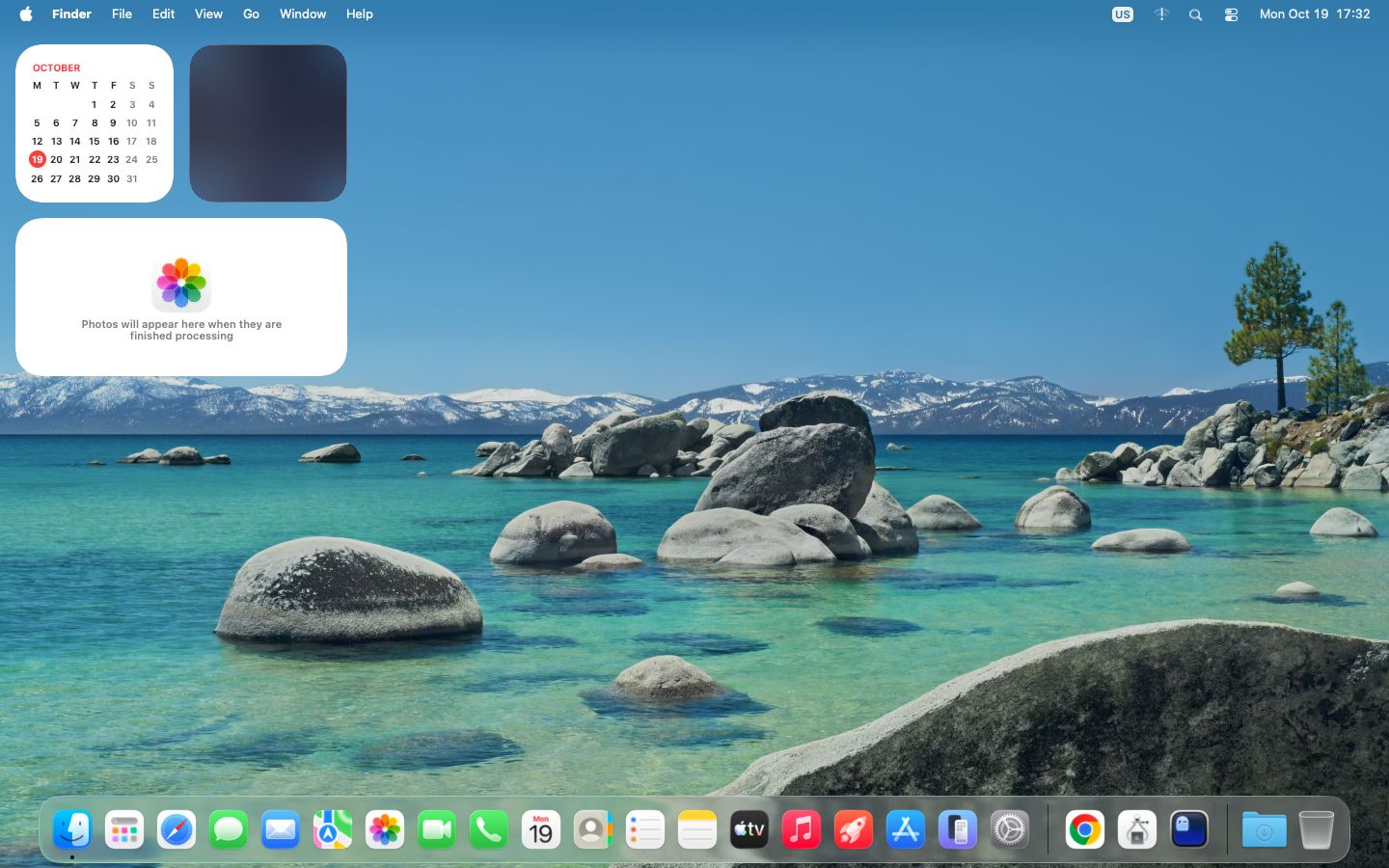
Any terminal
kitty's graphics (kitty, Ghostty, Konsole), iTerm2's images (iTerm2, WezTerm), or Sixel (foot, xterm, Windows Terminal), whichever the terminal answers to. Anywhere else, half-block characters in 24-bit color.
Keys and clicks
Alt is Cmd, since most terminals can't send Cmd. The toolbar's Cmd, Opt, Ctrl and Shift hold that key for your next key or click.
Leave it running
Ctrl-] disconnects; the VM keeps running. In the interface, v on a running VM opens the same viewer.
Hosts
A Mac or a Linux PC.
reims-ctl works the same on both. What differs is the guest it runs and where macOS comes from. macOS 26 Tahoe runs on both.
Apple silicon Mac
- Guest
- arm64 macOS
- GPU
- Metal, the default
- macOS from
- Apple’s IPSW, or a macosvm or tart VM you already have
- Machine
- QEMU vmapple on Hypervisor.framework
- Tested
- macOS 13, 14, 15 and 26 guests on an M3 Max
x86-64 Linux
- Guest
- x86-64 macOS; 26 Tahoe is the last release for Intel Macs
- GPU
- Vulkan, through metal2vulkan
- macOS from
- Apple’s installer, which reims-ctl downloads, booted through OpenCore
- Machine
- QEMU q35 on KVM
- Tested
- macOS 26 guests on an RTX 5080 laptop GPU
Reims vGPU has largely stabilized. The work now is the differences between platforms and GPU drivers, so how well it runs can still depend on your host and its GPU.
It is an independent project, not affiliated with, sponsored by, or endorsed by Apple Inc. It never ships macOS: every install comes from Apple.
Community
Questions, bugs, and the source.
Ask in the Discord. When something breaks, one command gathers what a bug report needs: the VM's logs and settings, its QEMU command, and the host's details, zipped into your Downloads folder.
$ reims-ctl report macos-26 # or b on the VM in the interfaceAttach the zip to an issue on steelbrain/reims-vgpu.